Hello everyone,
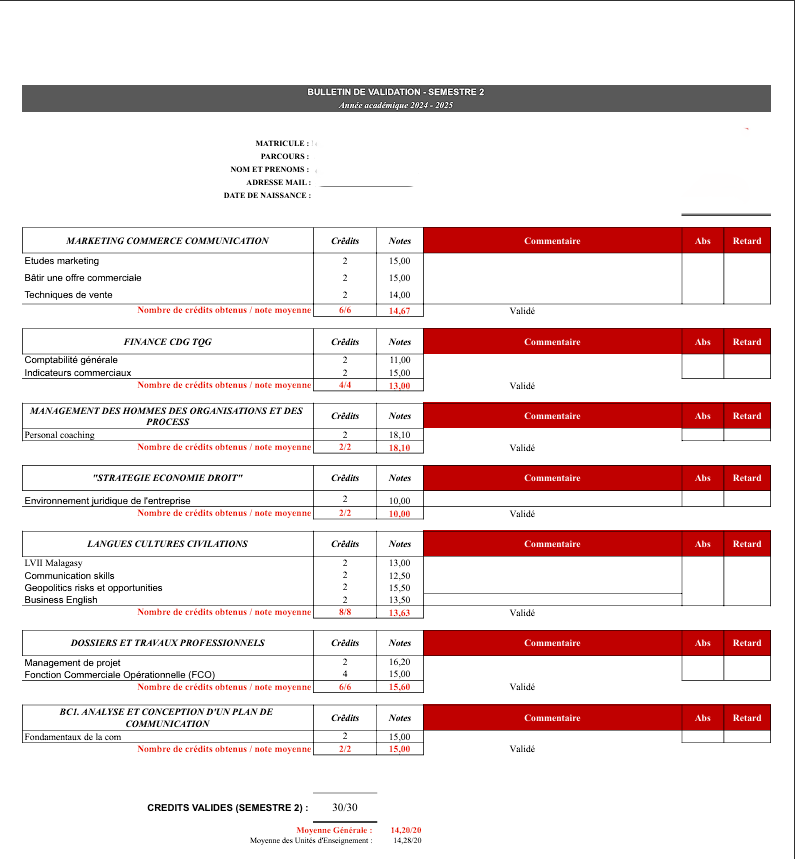
I am looking for step-by-step guidance on how to create a custom exam report card in Gibbon School Management. My goal is to replicate a report card that includes the following details for each student:
Subjects (e.g., Marketing, Finance, Management, Law, Languages, Professional Work)
Credits per subject
Grades per subject
Space for teacher comments per subject
Overall average, cumulative credits, or any summary section
The report should cover a specific semester (e.g., Semester 2, 2024-2025).
What I need help with: 1. Best practices for preparing subject/module setup and grade entry. 2. Setting up a reporting cycle and linking the necessary academic elements. 3. Designing the report template to match the required format. 4. Any tips or examples for generating and sharing these reports with students or parents.
If anyone has experience building similar report cards or can share example templates, your advice would be greatly appreciated!
Thank you so much for your help!
What you’re trying to build is possible in Gibbon, but it helps to think data preparation first, report design second. This can be done using Reporting Cycles in the Reports module, or by combining the Reports and Markbook modules. I’ve built several custom reports similar to this, so here’s a practical overview.
1. Subject / Module Setup (Most Important)
Before working on reports, make sure your academic structure is consistent.
Best practices:
Each subject (Marketing, Finance, Management, Law, Languages, etc.) should exist as a Course.
Within each course, create topics (Markbook columns), each of which should:
Be assigned a credit value
Be linked to the correct Term / Semester (e.g. Semester 2)
Ideally, map course classes to Form Groups for clean, predictable reporting.
Inconsistent course or class setup will make reporting much harder.
2. Grades & Comments
Your example shows one final grade per subject, plus credits and comments.
Use Markbook for assessments
Define one final calculated grade per subject:
A weighted Markbook column, or
A dedicated Final Grade assessment
Ensure grades are numeric and use a consistent scale (e.g. /20)
Subject comments can be added via:
Markbook comment fields, or
A custom assessment type for comments
3. Reporting Cycle
In Reporting Cycles:
Create a cycle such as Semester 2 – Academic Year 2024–2025
Link it to the correct School Year and Term
Enable grades and comments
Control visibility for students and parents
This tells Gibbon which data belongs to which semester.
4. Report Template Design
Using the Reports module:
Create a custom report
Group content by Courses
Loop through courses to display:
Markbook columns
Credits
Grades
Add calculations for:
Credits earned
Averages per group
Overall semester average and total credits
For PDFs:
Use tables
Control page breaks
Keep each subject block together
Your screenshot layout is very achievable with careful table structure.
5. Sharing Reports
Reports can be:
Generated in bulk
Exported as PDFs
Released by reporting cycle
Shared with students and/or parents using access controls
6. Examples
I’ve shared working examples and screenshots here:
Glad the overview was useful. If you get to the stage of building the actual report template, I’d be interested to hear how it goes. If you run into any snags along the way, I’m here to help.
Thank you for sharing your knowledge, but I have big difficulty to implement start from step 4. Can you please make a tutorial or step-by-step via YouTube especially in programming?
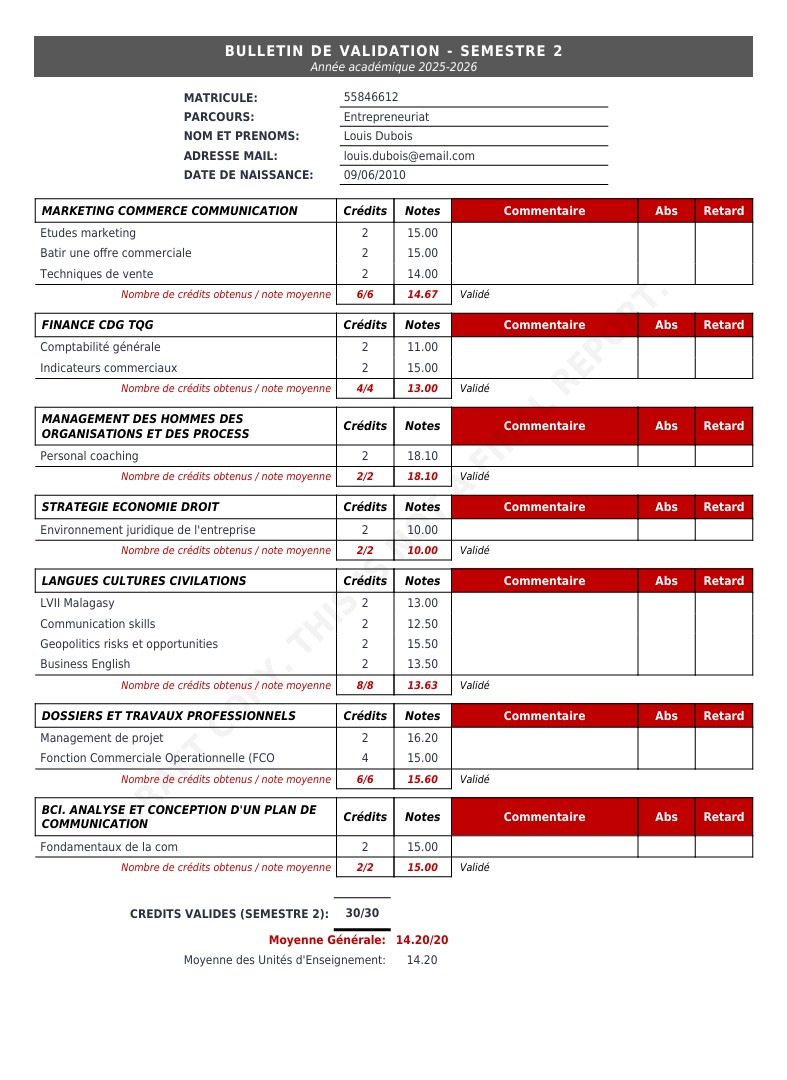
Thanks for the feedback — you’re right that Step 4 is where it gets technical. A YouTube tutorial is a great idea and something I’ll keep in mind, but I should be honest: the template design step is hard to generalize because every school’s report card is different. The data sources and Twig templates have to be built around each school’s specific structure, grading system, and layout.
That said, I did go ahead and build @t.santatriniaina’s report in Gibbon just to show it’s doable. Here’s a sample output: