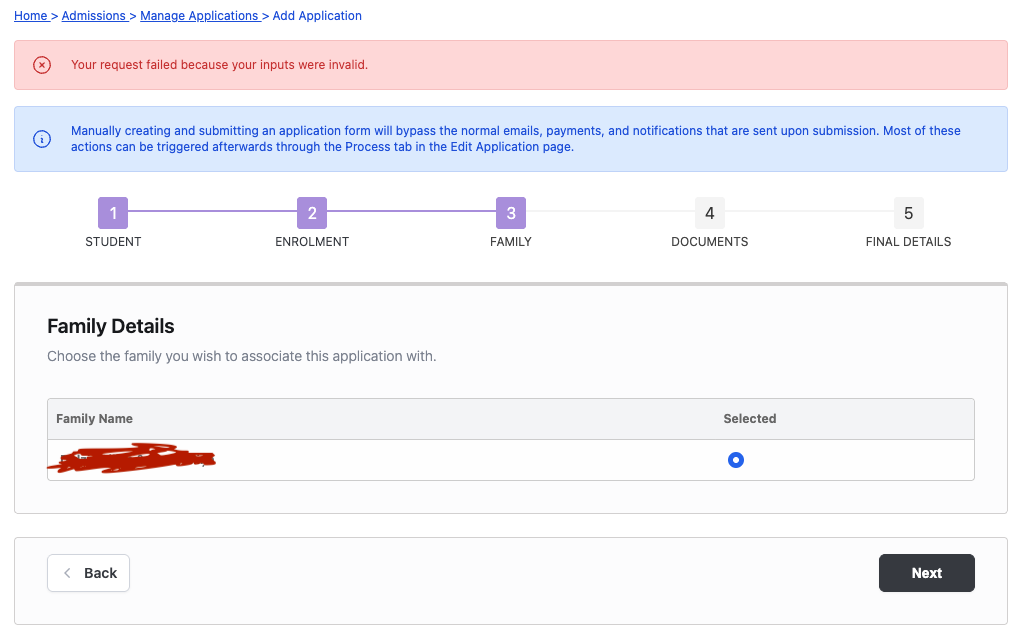
We are seeing this error with a family who is trying to add a third child via the admissions process. The first two kids went through the admissions process without any issues, but we are seeing this error with the third child on this page. Am I missing something obvious?
Hi @j.henry@akaplan
Thanks for reporting the issue to us. We will try to recreate the issue and investigate in the coming days and will update here when we resolve the bug. Thanks
Hi John, thanks for bringing this back to our attention. Our initial attempts to reproduce the issue hadn’t resulted in the error you are seeing, and it looks like there was a missed opportunity to follow up and ask for clarifying details to help find the issue.
It looks like you are using the Admissions > Manage Applications > Add Application form option, so the parent isn’t adding the form themselves, you’re adding it on their behalf? Can I check which option you’re choosing from the Add Application page: Current Admissions Account or Current User.
It does indeed look like required data is missing, which is the cause of the error you’re seeing. However, your screenshot looks correct from what I can see. Normally, there should also be a section on that page with parent details below that are read only. Are you able to check if these are present and filled in?
Generally, these values would be pre-filled from the existing family. However, the pre-fill may not be working, as in all my tests of the process, the prefill message should show on this page, but I’m not seeing it in your screenshot.
Can you share more details about any customisations you’ve made to the application form, such as adding or removing fields, or changing required fields? This can help narrow down what the cause may be.