Dear Support Team,
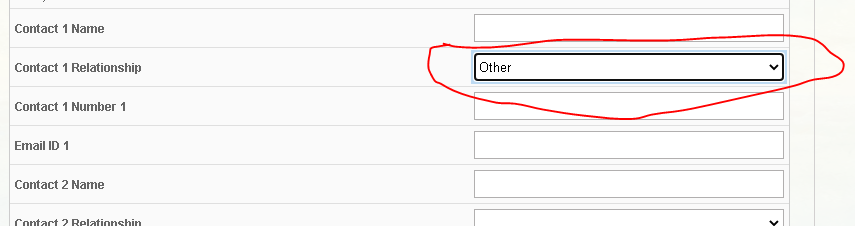
I want to some value in dropdown box of User’s Form, please guide me how to add it? for reference I have attach image.
Thanks in Advanced.
Dear Support Team,
I want to some value in dropdown box of User’s Form, please guide me how to add it? for reference I have attach image.
Thanks in Advanced.
I haven’t seen these fields in user forms before. Are these all custom fields? I yes, why don’t you use Gibbon’s family management system to keep info like this?
Hi vishalr, it looks like you may be editing the Emergency Contact section, with a string replace for the name. The relationship field offers a number of different options which are pre-defined in the system, there isn’t an easy way to edit these. One way to specify other relationships is to add it in brackets after the name of the contact. Otherwise, if there’s a relationship type missing from the list feel free to let us know and we may be able to add it.
@ross can i add these value from database?
I want to add these two relationship in list
1.Grand Parents
2.Guardian
Maybe this one can help.
Hi vishalr,
I’ve taken a look at the relationship options and I think these would be good options to add to Gibbon. The goal for emergency contacts is to list people who are not already parents or family members listed in Gibbon, so grandparents would be a good option to have.
I’ve made this change in the v21 development branch, which you can see here: https://github.com/GibbonEdu/core/commit/19efcc276d2502a93b08a2a206fb330e2bc77ccc You can apply the change to your own install by making the same code changes to src/Forms/FormFactory.php
Thanks!
Thank you very much @ross
Hi @ross
from this file https://github.com/GibbonEdu/core/commit/19efcc276d2502a93b08a2a206fb330e2bc77ccc , you’ve made since V21. If I want to add " Aunty, Uncle", I just add:
‘Aunty’ => __(‘Aunty’),
‘Uncle’ => __(‘Uncle’),
Also may be Brother, Sister?
Thank you for your kind reply.
I think for many cases the Other Relation option could work for this, but you’re certainly welcome to add it to your own system. Keep in mind that changes like these will be overwritten when you update your system, so you may have to re-do the changes each update.
Hi, I wrote a Python script to sync personal particulars from OrangeHRM to Gibbon - and the emergency contact relationship was copied across but did not show up on the form because they do not match any of the ‘predefined’ values. The predefined list is also strange / incomplete because it has Grandfather/mother but not Father or Mother.
Any way to make this drop-down more flexible, ie allow you to enter custom value? I don’t really want to touch the PHP codes since it will be overwritten on the next upgrade.
Thanks!
Hi @llh_uwing a slightly delayed response, but the reason that Father and Mother do not appear is because Gibbon already has direct family information, and emergency contacts are meant to be the next contacts to reach if the parents for a child cannot be reached. In the Student Profile, parent infromation is listed automatically in Emergency Contacts.
Hmm, ok I understand that from Gibbon design perspective … will need a separate workaround to deal with Parent then. Thanks
Since you already have a script doing most of the work, one option could be to map both the Father and Mother to the Parent option in Gibbon (which is one of the emergency contact relationship options), and then append (Father) or (Mother) after the emergency contact name, which is all one string. This wouldn’t require changing the code, because the logic would be in your sync script. Hope this helps!