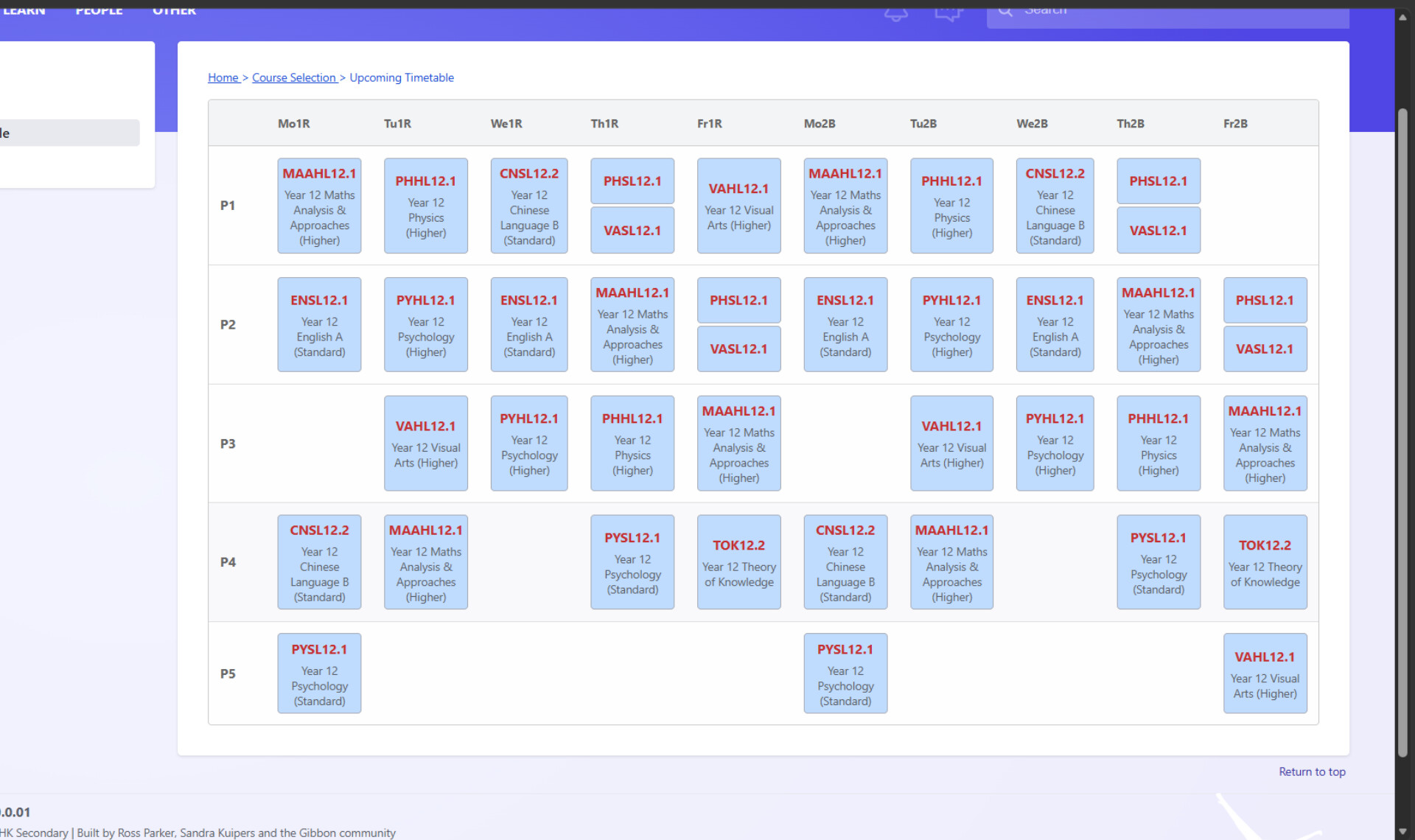
I’ve been working through the Course Selection module end to end on a demo-data install, because a university wants students to choose their own courses. I set up an IB-style Year 12 offering (seven blocks, 13 courses) and ran three students through selection, approval, the timetabling engine and Go Live. I also tested a clash, a course change after Go Live, the student’s own view, and full classes. It’s an impressive piece of work, and the engine handled every scenario sensibly.
I’ve split what I found into bugs, anomalies (behaviour that may be intended but surprised me), and suggestions for university use. I realise the last group goes well beyond what the module was designed for.
Environment: Gibbon v30.0.01, Course Selection v1.2.12, Linux/PHP host.
Bugs
-
The Go Live! and Clear All Results buttons do nothing on v30. Both open their confirmation pages with
tb_show(...)(tt_engine.phparound lines 291 and 310), and ThickBox no longer seems to be loaded, so clicking has no effect. Openingtt_engine_goLive.phpandtt_engine_clear.phpdirectly works fine. -
The selection form ignores a block’s Countable setting.
updateOfferingProgress()injs/module.jscounts every ticked course against the offering’s max, including courses in non-countable blocks. With a “Core” block set to Countable = N and an offering max of 6, the form greyed out TOK once six subjects were ticked. I had to set the offering to 7 to work around it. -
Enable Course Grades depends on
arrReportGrade/arrCriteria. These look like the original school’s tables (GradesGateway), which would explain the “Gibbons have escaped” error others have reported. -
The Upcoming Timetable grid layout breaks with long course names.
- Class boxes have a fixed height (
h-20) with centred content, so longer names overflow above and below the box. - The period label column is added once per row under the same column name, and reads its label from a fixed day index, so some rows lose their label.
- Empty periods are still rendered as blank rows.
- Classes are placed in columns by array position rather than by
gibbonTTDayID, which could put them under the wrong day if a period doesn’t exist on every day of the cycle.
I have a patched
upcomingTimetable.phpthat fixes all of this (tested on v30.0.01). It also gives the columns equal widths, and shows a double-booked slot as two stacked boxes instead of overlapping them, which makes clashes easy to spot. - Class boxes have a fixed height (
Anomalies (possibly intended, but worth a look)
-
“No approval” doesn’t seem to skip approval anywhere. In this 2022 thread you mentioned that with no approval, selections are automatically marked approved, and in this one that requests are deliberately not enrolments, which makes sense. In v1.2.12, though:
- The Require Course Approval setting is only saved and displayed (
settings.php/settingsProcess.php) and isn’t read anywhere else. - With the access type set to Select Courses (no approval), I logged in as a student and added a course. It saved as
Selected, with nocourseSelectionApprovalrow, and appeared unticked on the Approve Requests page. The only places that create an approval row are that page and Copy Selections by Course (with status Approved). - The engine only considers choices that have an approval row.
So in practice staff have to approve every request either way. Is “no approval” meant to auto-approve for the engine?
- The Require Course Approval setting is only saved and displayed (
-
Block and offering min/max are only enforced in the browser.
selectionChoicesProcess.phpsaves whatever is submitted. A student with no English and no science, and another with History HL and History SL together, both saved. On the approval page, “Complete” only compares the number of courses with the offering minimum. One student shows “Complete: 7 of 7” while still having no course from the science block, which has a minimum of 1. -
A clash with tolerance 0 fails the whole student. Both classes in a clash count as a conflict (
ConflictValidator::validateNode), so one clash needs tolerance 2. At 0, the student ends up with a single Failed row and none of their clash-free courses placed, although in this thread you mentioned the engine should return incomplete timetables even when it fails. Auto-Resolve doesn’t help, because it only runs on combinations that already passed the tolerance check. With tolerance 2 it worked well: five courses placed and the clashing one flagged “Conflicts with higher-priority …”. -
Dropping a course after Go Live doesn’t unenrol the student. The engine turns every existing enrolment into a
Lockedresult (tt_engineRun.php), whatever the choice’s status, and Go Live only inserts rows (INSERT IGNORE). When I swapped Chemistry SL for Physics SL after Go Live, the student ended up in both. Her selection page showed only Physics, while Upcoming Timetable showed both. -
Approved choices are locked on the form, even for admins. To change one, you have to untick its approval on the Approve Requests page first. That’s reasonable as a control, but nothing on the form says so.
-
Upcoming Timetable_myis off for students by default. Students can choose courses but can’t see the timetable that results until an admin grants the permission. -
The Full flag only names one class. When every class of a course is full, the reason still reads like “Full class: TOK12.2”, which could suggest to staff that the other class had space.
-
Installing fails without an Upcoming school year. The
activeSchoolYearsetting is filled from a subquery for an Upcoming year, so the install errors with “Column ‘value’ cannot be null” if there isn’t one (reported here). Falling back to the Current year might avoid that.
Suggestions for university use (outside the original scope)
I don’t expect any of these from the module as it stands. I’m listing them in case any fit your plans, or so that I can build them as an add-on without clashing with yours.
- Server-side rule validation, so block and offering limits are enforced when saving and at approval.
- Prerequisites.
rules_manageis commented out in the manifest. Is it worth reviving? - Mutually exclusive courses, for example “not the same subject at two levels”, and credit or level rules (“at least 3 HL”, “minimum credits”). Perhaps building on the Custom Fields credit approach you suggested here.
- Add/drop sync, an option at Go Live (or a separate tool) to remove enrolments whose choice is Removed.
- Waitlists and alternates. At the moment a full course is just flagged and skipped.
- Seat priority, deciding who gets the last seat by registration time, programme or seniority. Today it’s Student Order (year group, then a hash of the student ID).
- Terms or semesters. The module has a single target year.
- Student self-service changes within an add/drop window, without staff having to unapprove first.
I’m happy to share my test setup and queries, and to send PRs for bugs 1, 2 and 4 if that would help.
Thanks,
Tieku