Hi,
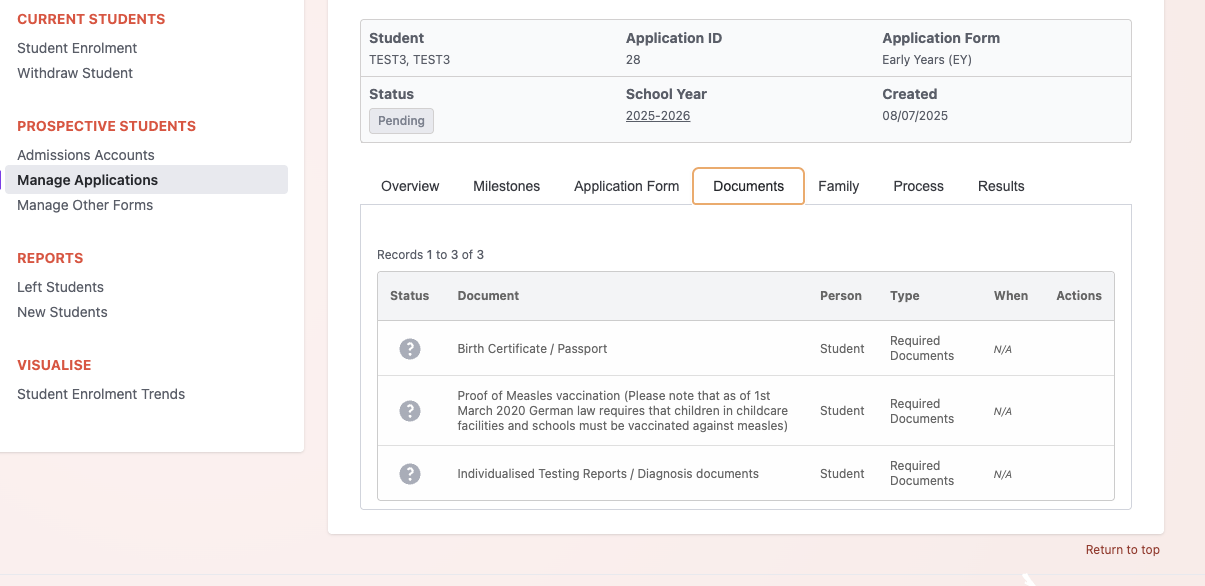
I’m using the ‘required documents’ field in three admissions forms separated into EY, LS & upper school. All of the admissions forms complete without errors, but when I go to ‘manage application’ in admissions, the documents uploaded have a ‘?’ in the status. (see attached)
Below is the content I’m using to define the options in each form. I get the same result for each one. I also created a test form that only included the ‘Required Documents’ form, and this also displays the document status as a ‘?’ I haven’t done anything outside of the options available in Gibbon. Any help or guidance would be thoroughly appreciated.
Cheers,
John
EY
Birth Certificate / Passport,Proof of Measles vaccination (Please note that as of 1st March 2020 German law requires that children in childcare facilities and schools must be vaccinated against measles), Individualised Testing Reports / Diagnosis documents
1 to 5
Proof of Measles vaccination (Please note that as of 1st March 2020 German law requires that children in childcare facilities and schools must be vaccinated against measles),Birth Certificate / Passport,Grade 2 - 5: Last 3 report cards (Translated into English) & Letter of Recommendation Homeroom teacher,Individualised Testing Reports / Diagnosis documents
6-12
Birth Certificate / Passport,Proof of Measles vaccination (Please note that as of 1st March 2020 German law requires that children in childcare facilities and schools must be vaccinated against measles),Recommendation from current school,Transcript,Self Evaluation Form/Essay,Grade 9 - 12: Last 3 report cards (Translated into English),Individualised Testing Reports / Diagnosis documents
Update: The documents I’m uploading are in the database, so the upload process is working- in view under ‘manage applications’ - edit - documents tab is unable to read/retrieve the documents.